



Set schedule to top up mobile phone number
verifiedYou can set schedule to top up mobile phone number (one time, weekly, or monthly) automatically for all mobile operators in ACLEDA Super App conveniently.
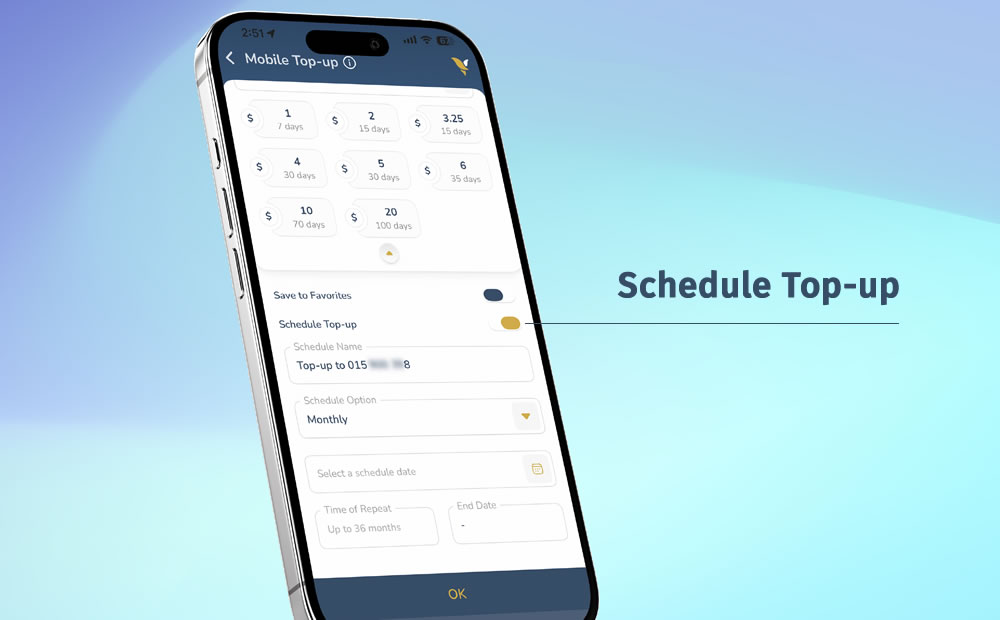
- Open ACLEDA Super App
- Choose "Mobile Top-up"
- Use Touch ID, Facial, or enter PIN to login
- Enter mobile top-up information
- Choose "PINLESS"
- Choose debit account
- Input or select mobile number
- Select or input top-up amount
- Enable "Schedule Top-up"
- Enter schedule name as needed
- Select schedule option (One Time, Weekly, Monthly)
- Select schedule date and time of repeat (the system will settle on the scheduled date at 12 noon)
- Press "OK" button
- Verify your mobile top-up information and then press "Confirm" button
- Your transaction was completed